Hidden Messages in the Epstein Emails?
Mark Honeychurch - 17th February 2026
With the recent release of millions of digital files (mainly emails) related to Jeffrey Epstein, there’s a lot to go through. Both journalists and activists are combing the documents for people they want to name shame - politicians, celebrities, culture war pundits, etc.
From a skeptic’s perspective, it’s interesting not only to see which infamous names appear in the emails (Deepak Chopra appears to have been very good friends with Epstein, for example), but also those who have in the past aligned themselves with the skeptical movement, e.g. Lawrence Krauss, Steven Pinker, Richard Dawkins, Daniel Dennett and Sam Harris. Of course, just being name dropped in Jeffrey Epstein’s emails is not proof of any kind of wrongdoing, and even where someone has been directly emailing with Jeffrey Epstein that doesn’t prove that the person is guilty of any wrongdoing.
On the flip side of those in our movement who seem to have been connected to Epstein, several skeptics have been mentioned in the context of being a thorn in the side of Epstein and his friends. Susan Gerbic gets a mention, in the context of her Wikipedia editing being problematic, in a conversation between Rome Viharo, Deepak Chopra, Daniel Pinchbeck and others. In the same conversation, the Novella brothers from the SGU podcast are also listed - as they were slated to be speakers at a TAM conference.
Both here and elsewhere, if numbers of mentions in the Epstein Files are given (like “Lawrence Krauss appears more than 5,000 times in the Epstein files”), be aware that these numbers are often inflated. Every sent and received email is included separately in these email dumps, and most of the emails are replies. Given that it’s fairly standard for email replies to contain a copy of all previous emails in the same thread, this means that a word that is just used once may show up in multiple emails from a conversation or thread. For example, in a conversation of five back and forth emails, a single mention of a word such as “Dawkins” in the original email will show up in five separate documents (once in each of Epstein’s emails that he sent, and once in each he received), even if “Dawkins” is never mentioned after the initial email.
One thing that’s piqued my interest is just how quickly conspiratorial thinking has crept into some people’s analysis of the documents. Given that the vast majority of the emails in the document dumps are mundane and innocent in nature, I get that there’s a temptation to think that maybe that mundanity is a smokescreen, a way to secretly deliver messages about trafficking people around the world that would only be understood by the sender and receiver, and would be opaque to anyone eavesdropping in the middle. But it seems much more congruent that even the most dastardly, horrible person in the world still has to deal with the chores, decisions and idle conversations of everyday life. That being said, here’s how some people appear to be reading far more into the emails than I think is justified.
Food Codes
We can thank “news” outlets such as UniLad who, in their efforts to maximise clicks, have attempted to revive the Pizzagate conspiracy from the last decade, fueling renewed speculation about the use of food-related words as code-words for illegal activities. You can read more about Pizzagate, where the leak of John Podesta’s emails prompted conspiracy theories to surmise that mentions of cheese pizza, walnuts and ice cream were evidence of a child sex trafficking ring run by Democrats, in this great article from the New York Times.
There’s a list floating around at the moment that lists some of the foods that you can find in the Epstein emails, and what the FBI have supposedly claimed they mean:
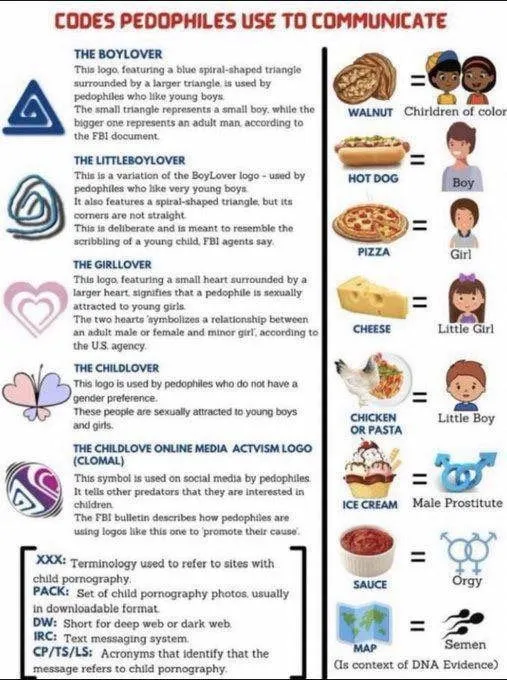
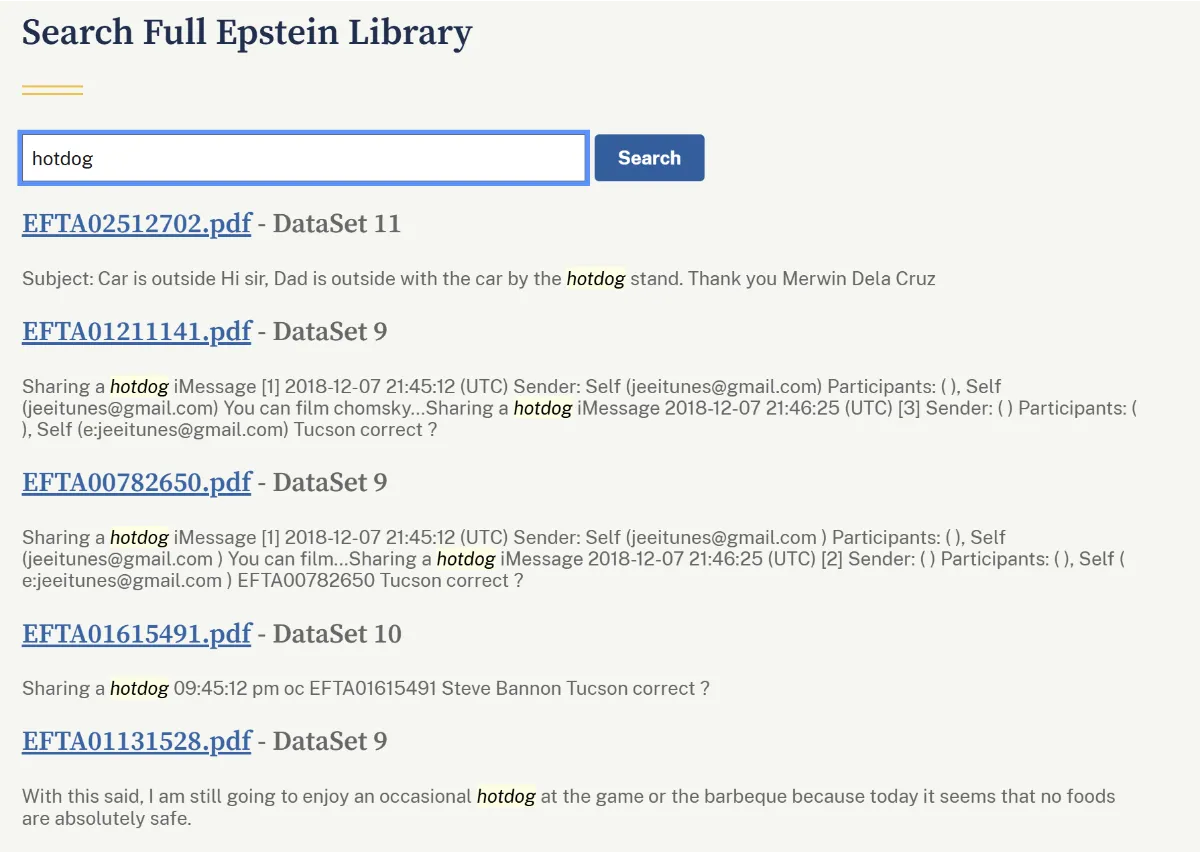
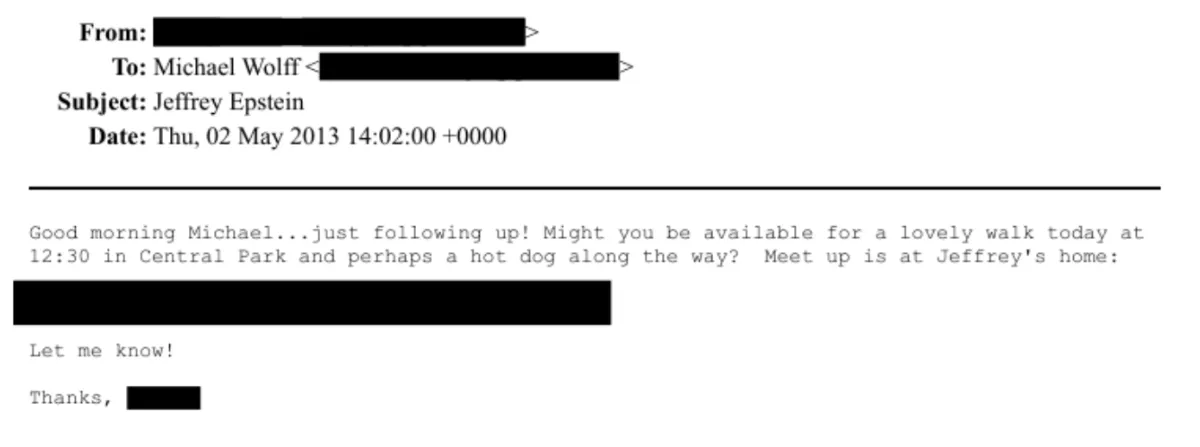
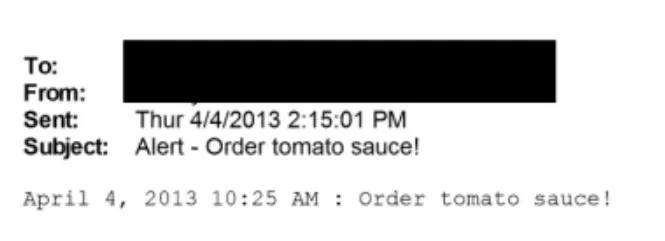
Of course, there’s no evidence that this list really comes from the FBI, or that it’s been verified in any way as an established system of secret signalling. Searching for these words brings up a lot of mentions that look nothing like they’re being used as a code, as they’re perfectly in context with the paragraphs they sit in. Walnut is mentioned when discussing wooden furniture, sauce is used in the context of more general food talk, and hotdog is only mentioned three times (if duplicate emails are ignored) - although “hot dog” with a space gives close to 100 results, many of which seem to be duplicates of a single email conversation between Epstein and journalist Michael Wolff.
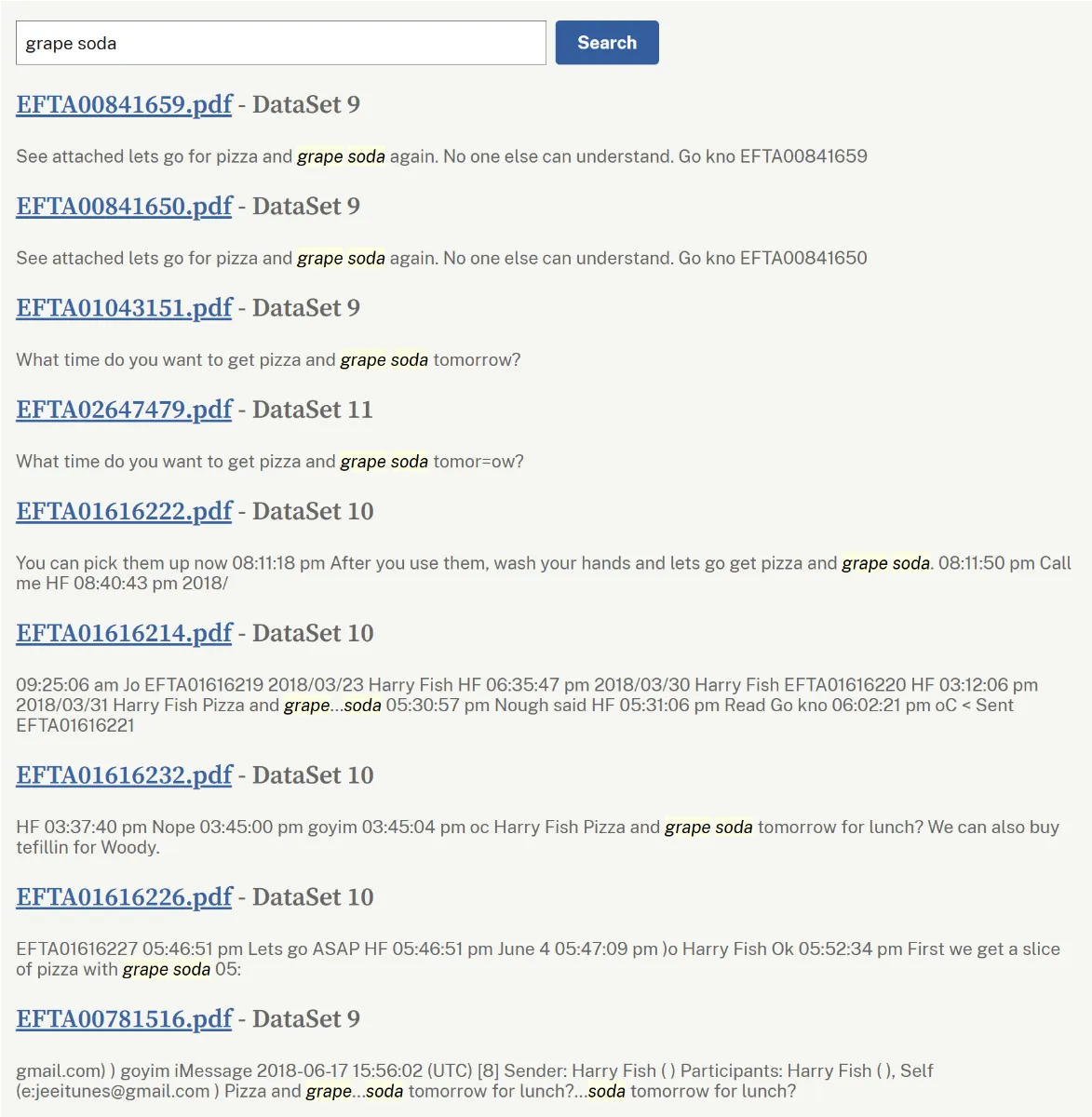
As well as this list, apparently “grape soda” is another important code word - although you wouldn’t think so if you looked at how few results there are when searching for the phrase in the files. This is every mention of “grape soda”, and it’s immediately obvious that a lot of them are repeats of the same single email in a longer email conversation:
There’s a great response to this claim in the /skeptic Reddit group that summarises it well:
First, … Epstein never used the word pizza or cheese or anything like that as a secret sex code word. There are zero instances of this. If there was one euphemism for the girls he abused, it would be “massage therapist.” That was the ruse. They were mostly fake sexual massages. That was the nature of the abuse.
And the second problem is, Pizzagate was and still is 100% fully fake and also in that case nobody was ever speaking in pizza code. Pizza code in the context of sex trafficking is not and has never been a thing.
Epstein trafficked the girls brazenly, openly and proudly. In his twisted mind, there was nothing wrong with forcing teenagers to have sex for money. Hence the lack of secret spy codewords.
You can search pizza yourself in the files and you’ll see it’s all just food talk. There’s plenty of other damning stuff, but we are barking up the wrong tree with this Italian food codex fantasy.
We already have plenty of real evidence of Epstein trafficking girls, we don’t need to hallucinate more. The victims have told us what he did and how he did it. Secret culinary codewords were not part of it.
Even rich people eat pizza, I promise. Especially in New York City.
Whoops
Another trusted media source, Lad Bible, would have us believe that Epstein’s use of the word “whoops” is some kind of code word related to people being killed. This one’s just silly, and the article doesn’t even make a lot of sense - I suspect maybe someone used AI to do their work for them:
A disturbing theory has surfaced about another potential code word which is prevalent throughout the Epstein files.
…
Now it’s been revealed, thanks to the new website that allows users to access Epstein’s emails as if they were their own, that the paedophile used the word ‘whoops’ in 316 emails.
Shockingly, it seems as if it was Epstein’s strange choice of word whenever someone was revealed to have died, as he replied to one email about the death of Deutsche Bank managing director Steven Elkman with ‘whoops’.
A particularly disgusting email reads: “She said that she felt Gods presence next to her when she was in bed. She knows that Jesus watches over her…Whoops!”
In this case, Epstein either seems to be referring to the sexual abuse or death of the young girl.
It was also his choice of response when he learned about the death of Robert F. Kennedy Jr’s estranged wife Mary, after she tragically hung herself in 2012.
Another exchange sees Epstein reply ‘whoops’ after a redacted individual writes that they’re giving Epstein ‘permission to kill’ someone who has lied to both him and the redacted recipient. It appears again when he hears about the alleged rape of a young woman.
This doesn’t look like a code word to me at all, even if I try to imagine it from a conspiracy theorist’s perspective. It just looks like very bad humour.
Random words
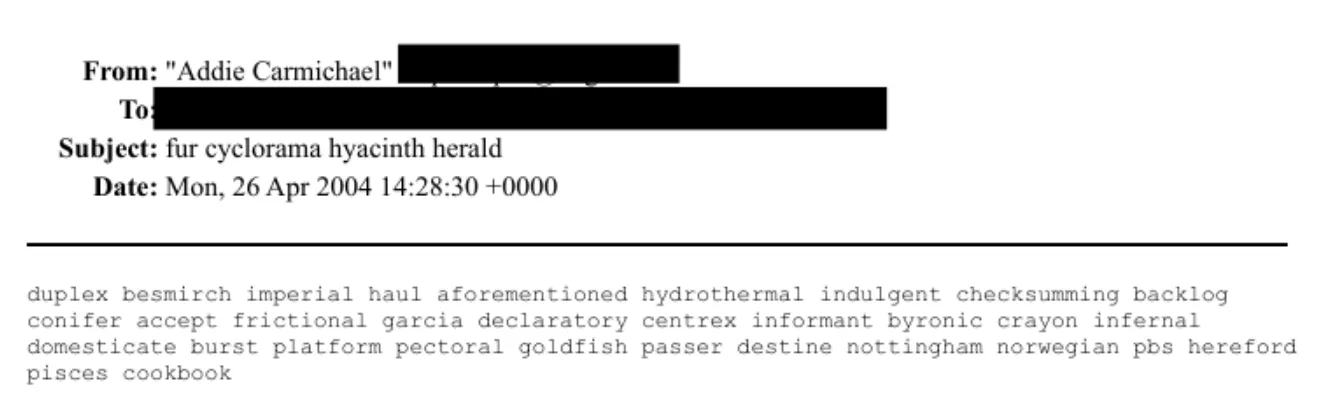
On seeing the above email with a string of random words such as byronic, goldfish and pisces, one keen code cracker on reddit thought they had spotted a simple cypher being used, where the first letter of the first word, second letter of the second word, and so on spell out something meaningful:
I’m sensing signal using diagonal plaintext.
fur = 3, add 1, therefore “fur cyclorama hyacinth herald” = “fyaa” as subject line; then… duplex = 6, add 1 = “deplete” as partial or full first term … pbs = 3, add 1 = “pesk”
In between it breaks down with how I’m stumbling through it. Maybe seeing “caneta” (pen), perhaps as a euphemism. Or stock symbols?
Edit: Here’s what I’m sensing:
depletem boccirxn brfetoah petw pesk
Thankfully cooler heads prevailed on the r/codes subreddit, and someone quickly jumped in to let the original poster know that this was more likely to just be a result of spammers trying to evade spam filters than people hiding nefarious intent:
If you’re seeing this in the “Epstein Files” or any early-2000s email dump, you aren’t looking at a secret code or a hidden ledger. You’re looking at a fossil from the Great Spam War of 2004.
This technique is called Bayesian Poisoning (or “Word Salad”), and here is why it exists:
1. The Tech Behind the “Nonsense” In 2004, email providers started using Bayesian filtering. These filters calculated the probability of an email being spam based on the words used. If an email had “Viagra” or “Winner,” it got blocked. To beat this, spammers started including blocks of random, high-quality dictionary words (like hydrothermal, nottingham, and imperial). By diluting the “spammy” words with hundreds of “legitimate” words, they tricked the filters into let the email through.
2. Why these specific words? Subject Line: fur cyclorama hyacinth herald — Spammers used random word generators so that every single email sent had a unique subject line. This prevented filters from flagging 10,000 identical messages. The List: Words like garcia or checksumming were chosen because they were statistically “safe” words rarely found in junk mail at the time.
3. Why is it in the Epstein Files? When legal teams or government agencies sub-poena a person’s inbox, they don’t just get the “important” stuff—they get a complete digital forensic image of the account. This includes every piece of junk mail, Nigerian Prince scam, and word-salad bot that ever hit their server.
To a researcher in 2026, it looks like a spooky cipher. To an IT admin from 2004, it’s just a reminder of how annoying our inboxes used to be.
TL;DR: This isn’t a code. It’s a “Word Salad” designed to trick 20-year-old spam filters. It’s in the files because lawyers archived the subject’s entire inbox, including the junk mail.
Mangled Text
On the AskReddit subreddit, there’s a conversation about something that’s a little more interesting than just words with double meanings. Someone asked the group about a set of related typos that can be seen throughout a lot of the emails: “Why do you think a lot of the Epstein emails have the same typos, like equal signs, extra letters, and extra spaces?”
Now, this is something we can get our teeth into. It’s true that many emails have these issues. Here’s a great example of an email, sent from Jeffrey Epstein to Sam Harris in 2015, that has extra spaces, three equals signs and an “=C2” at the end of the paragraph:
sam, we met with =ohn brockman at the ted event . I thought you might enjo= a dinner with woody alien , chomsky and me, it should be fun=C2
jeffrey epstein
(As an aside, rather than being aghast at being invited to dinner with two known child sex offenders, Sam simply replied with “Only if we film it… :)”)
Before we dive into some plausible, technical answers to why this email is mangled, first here are some wrong answers from the reddit thread as to what’s going on:
So.. I noticed this… and it is intentional because in subsequent emails the equals sign will be in a different location (like when it has previous replies on the next email) .. and =C2 is used a lot, I think it’s like e=mc2…. I dunno that’s just my first thought because he’s into alternative energy and such
I think C2 is a tactical intel term for Command & Control. I’ve noticed a commonality of using =C2 when talking about an individual and referencing what could be a soft spot for that person to control them.
For instance, when talking about Trump, Epstein wrote Melania =C2; sex before and after Baron’s birth. Probably in reference to him paying to have sex with Stormy Daniels when Melania was pregnant. Epstein may have facilitated this transaction.
Okay, so obviously those both look like a bit of a stretch - just guesses, with no real evidence to back them up. Here’s what I’ve managed to figure out:
Firstly, the typos are just typos. Both Epstein and many of the people writing to him are pretty sloppy when it comes to writing, and some of them just aren’t very good at spelling. This is what we’d expect from a random segment of the population, and this is what we see when we look at the emails. Some people write impeccably, others are atrocious and some people manage to write well at times, but devolve into writing in something akin to text-speak at other times.
The =C2 is a result of the wrong character set being used for decoding the emails. Get ready for a long and geeky explanation…
Long ago, we had ASCII, which used one byte (consisting of 8 bits) to represent all the characters a computer needed. These characters were the upper and lower case letters, numbers, punctuation (comma, full stop, colon, semicolon, and so on) and other common symbols (percent, asterisk, caret, tilde, etc), as well as control characters (such as enter, tab, backspace). These all fit nicely within 128 characters, which is 2 to the power 7 - meaning that 7 of the 8 bits in a computer byte were used for each character, and there was a spare bit (or 128 spare values) that could be used at a later date.
When computers became more commonplace, it was quickly realised that the existing, basic 128 characters that ASCII had didn’t account for the needs of the rest of the world, which use a multitude of alphabets and character sets. Also, the spare 128 values in ASCII were woefully inadequate to store all the thousands of accented letters (acute, grave, circumflex, cedilla, macron, etc), Chinese, Korean and Japanese characters, emojis, lines, arrows and much, much more that people wanted to be able to use.
Various schemes were invented that would allow for encoding of these extra characters. The most popular of these schemes today is UTF-8, which uses one of the characters that’s not used in ASCII, 194 (which is 0xC2 in hex or 11000010 in binary) as an “escape sequence”. When a computer sees 0xC2, it knows that the next one to three bytes will be used for a special character, and it uses the UTF-8 lookup table to figure out which Unicode character to display (Unicode is an attempt to build a universal list of all on-screen characters that a computer will ever need).
Okay, so now we know why UTF-8 uses 0xC2. But what if a computer doesn’t know that some text is encoded with UTF-8, and tries to decode it with one of the many other extended character encoding schemes out there? Well, in the case of Epstein’s emails, this appears to have been exactly what’s happened. If text encoded with UTF-8 is decoded with something like Latin-1 (also known as ISO-8859-1), a common Windows encoding scheme for Western European countries and the US, it can choke on the 0xC2 byte and simply print it out as “=C2”. So the instances of =C2 in the Epstein emails, rather than being oblique references to special relativity or mentions of Command & Control, are much more likely to have been some rookie error when it came to opening these files in an editor, or processing them with a piece of software, and choosing the wrong encoding.
So what about the equals signs that look like they’ve replaced letters in the emails? Now bear with me - we’re about to jump into a second long-winded technical explanation…
Back in the day, when emails were displayed on text terminals (e.g. green screen monitors), a screen would usually have a width of 80 characters. To ensure emails looked good when being read on a terminal, it was good practice to add a newline (Enter) at some point before every 80 characters - apparently anywhere between 72 and 78 characters was seen as acceptable.
Going back even further, way back to 1969 when networks were in their infancy, a system was set up for documenting proposed internet standards. The documents were called RFCs, or Requests for Comments, and they were numbered proposals that people would submit that could then be discussed, refined and then maybe eventually be adopted as an official standard by the Internet Engineering Task Force (IETF). Many of these RFCs, even though they weren’t officially adopted, are still considered today to be a “good thing to follow” (and others, such as IP over Avian Carriers - RFC1149, and the Hyper Text Coffee Pot Control Protocol - RFC2324, are more humorous than practical).
A way of following this 80 character limit for emails, while also allowing for longer lines of text, was written up as an RFC2045. This RFC discussed breaking up an email by using a newline and an escape character, with use of an escape character allowing an email client to detect and remove the newlines that had been added, restoring the original long text lines.
We now need to learn a little about newlines. A newline is an ASCII character that tells the computer to move the text to the next line. However, there are two different characters in ASCII that practically do the same thing on modern computers - there’s a Carriage Return and a Line Feed. The Carriage Return was historically a command to move the carriage (on old electronic typewriters, the carriage held and moved the paper as the letters were typed) to the far right, so that the next letter would be typed on the left side of the paper. And the Line Feed (or New Line) was a command that told typewriters to roll the carriage upwards, moving the paper up so that typing would happen underneath the previous line of text.
In modern computing terminology, a Carriage Return is often shortened to either “cr” or “\r”, and a Line Feed is known as either “lf” or “\n”. The \r and \n are two characters, but each of them is just a visible representation of a single invisible ASCII character - one that moves the cursor to the far left, and one that moves it down a line.
There are three main Operating Systems that run on modern computers - Unix (including Linux), MacOS and Windows. So you’d think that when it came to deciding how to use these old control characters to denote moving the cursor down to the next line they’d pick one of the two and use that. But, if you’ve been using technology for a while you’ve probably figured out that it’s never that simple. Back in the day Apple decided to use the Carriage Return (\r) in its text files (although it follows Unix standards now), Unix picked the Line Feed (\n), and Microsoft decided they’d use both a Carriage Return and a Line Feed, in that order (I guess that because both moving the paper up and moving it to the right were needed on a typewriter to start typing a paragraph on a new line, Microsoft at least picked the option that was more backward compatible).
So, back to our email RFC. RFC2045 chose to use the Microsoft method of marking a newline, and picked the equals sign as its escape character and 76 characters as a nice limit. So email software that found lines of text that were more than 76 characters long could inject an equals sign (=) followed by a Carriage Return (\r) and a Line Feed (\n) to wrap the text, and at the other end if “=\r\n” was found, these three characters could simply be removed to restore the original long text.
It’s these text wrapping characters that were in many of the Epstein emails, and it’s another case of a rookie decoding error that has caused the mess that we see in the files where a letter gets replaced by the equals sign from this special character sequence.
Firstly, a piece of software has converted all Windows-style line-endings that it found (all instances of \r\n) with Unix-style line endings (\n). No doubt the software did this with good intentions, but whoever was responsible for this should have spotted this early on and turned off the line ending conversion setting.
Once that edit had been made to the files, the email interpreter would no longer have been able to fix the text wrapping, as all instances of the special characters it was looking for - “=\r\n” - will have been replaced with “=\n”. Not only would the emails now have this nonsensical pair of characters throughout, but there’s another problem that this can cause.
Some email interpreters, while processing the text in an email, can treat the \n as two characters, seeing both the slash and the n rather than understanding that it’s shorthand for a Line Feed. On top of this the software reads the backslash as a Unicode escape character, expecting it to be followed by two characters that together encode for a special character - much like the UTF-8 encoding we talked about earlier. But much of the time the next two random characters are an invalid combination, and so the interpreter just deletes them. This includes not just the “n” that was in the Line Feed, but also the first letter of the next line of the email.
The upshot of this series of unfortunate events is that a valid character is deleted from the email, and an equals sign from the special 76 character wrapping code is left behind. If this is as clear as mud, here’s a practical example of what would happen to a word in an email that crosses the 76 character boundary.
First we’ll take the beginning of a legal disclaimer in one of the Epstein emails:
The information contained in this communication is confidential, may be attorney-client privileged
The software that sends this email attempts to be well behaved and wraps it at 76 characters, using an equals sign to show that it’s responsible for the wrapping:
The information contained in this communication is confiden=
tial, may be attorney-client privileged
Now the receiving email client is free to remove the equals sign and the newline and restore the original text. From now on, rather than using a real newline I will use the \r and \n codes to show where the newline has been placed. So, with the equals and the \r and \n Windows newlines added, the email would look like:
The information contained in this communication is confiden=\r\ntial, may be attorney-client privileged
From now on we can also just look at the one word that has been broken over two lines - confidential. After being forced to wrap at 76 characters it now looks like this:
confiden=\r\ntial
What’s meant to happen is that the receiving email client would delete the “=\r\n”, restoring the word “confidential” and unwrapping the text. But, with many of the Epstein emails, what appears to have happened is that first the Windows newlines were replaced with Unix ones:
confiden=\ntial
After this, any attempt to detect and undo wrapping at 76 characters will fail, as there is no longer a “=\r\n” in the word.
The next processing step looks for any escape character backslashes - “\” - and then reads the next two characters after the backslash and looks them up in its Unicode translation table. For our word, this code finds the backslash along with the letters “n” and “t”, and tries to decode them. When it doesn’t find a valid character to replace “\nt” with, it just deletes it, assuming that it’s broken. This leaves us with:
confiden=ial
So practically it looks like the letter “t” has been replaced by an “=” sign - which seems a little odd. I can imagine some people thinking that the letters that have been replaced by the equals signs might have some significance. Maybe when written down they spell something out? Maybe they’re used in conjunction with a one-time pad to convert them to a different letter, and that spells something out? Maybe each missing letter means something, much like the words “pizza” and “hotdog” supposedly do?
But no, this is just a simple comedy of errors - none of which should have happened in the first place if the people working on the files were competent. All they needed to do was to ensure that their software wasn’t “fixing” the Windows-style “\r\n” newlines, and replacing them with the Unix-style “\n” newlines and everything would have remained un-mangled (well, except for the gratuitous redactions!).
Failing this, a simple spot check of the post-processed text during testing of the conversion process would have highlighted the issue, and it could have been triaged before they processed the entire set of emails. Fixing this properly now would require a time-consuming re-processing of all of the documents, but I’m guessing that’s probably not going to happen.
For a lot of these missing letters in the emails, there’s likely to only be one valid word that matches the pattern where one letter is missing. In our example, “confidential” is the only word that starts with “confiden”, has one letter, then ends with “ial”. So a simple dictionary lookup would be enough to find and fix this word, and many others like it. It would be somewhat processor-intensive, but wouldn’t take too long.
However, for some of these words there will be ambiguity as to the correct word, as there will be more than one valid word available - for example, “s=ream” could be “stream” or “scream”. Obviously the context these words are used in will make it obvious for some of them, but there will likely be some where it will be non-obvious and automatic fixing of the text won’t be possible.
Fun fact: While looking into this, I learned that words that differ by a single letter are called “orthographic neighbours”. Also, thanks to Michael Psonak (Primagen on YouTube) for a great video that explains some of the technical details of this weird conversion error:
See for yourself
If you’re interested in having a look for yourself, you may want to consider using a third party search as the US government’s official portal is fairly limited - it only allows for a continuous string search. So, if you search for “pizza grape” at justice.gov/epstein, it won’t return emails that have the text “pizza and grape soda”, for example - just ones that have the words “pizza” and “grape” together. I would recommend using jmail.world, where some enterprising person has set up a website that looks suspiciously like Google’s GMail interface. The site not only has emails, but also photos, travel details, purchases, documents, SMS messages and more.